LiberKey: To Make Your Life Easier!
https://www.liberkey.com/

All portable software application.
Portable use (can be installed on USB key, external hard drive, music player such as iPod). LiberKey installed on your portable device can be plugged in any computer. Immediately you have under hand all your familiar tools.
Main assets of LiberKey.
100% mobility with portable applications
A rigorous selection among more than 1800 applications
Updates of LiberKey directly by Internet
You can temporarily associate files extensions (.avi, .jpg, doc.,…) with LiberKey applications
And, it is free, without virus, spyware, adware, popup, etc.
More software can be added from catalog.
https://www.liberkey.com/en/applications/browse-catalog.html.
See list of Softwares from below link.
https://www.liberkey.com/en/component/content/article/3.html
Enjoy.
Shailesh
https://shahshaileshs.web.officelive.com/
If You Can't Excel with Talent, Triumph with Effort.
Free Addins Office Menu-2003 for Office-2007
https://shahshaileshs.web.officelive.com/MenuAddins.aspx
Free Exshail Classic Menu for Excel-2007
https://shahshaileshs.web.officelive.com/Exshail_Classic_Menu.aspx
Free Accounting & Inventory Software Busy UL 3.6 from Busy Infotech.
https://www.busy.in/index.php?p=fas
Serving Society through IT


 Dual-panel File Manager
 IE-based Web Browser
 Utilities
 Exp+ Basic Toolbox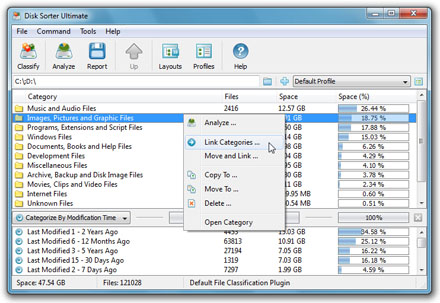

 The FlexTk file management toolkit is capable of scanning disks, network shares and enterprise storage systems, classifying all the existing files and organizing them into a categorized file hierarchy. FlexTk automatically recognizes more than 2000 file types and allows one to browse or export the categorized file hierarchy, perform various actions on specific files or file groups and physically reorganize existing files according to a user-defined list of rules and policies. The FlexTk's built-in file organizing engine allows one to define multiple organizing rules and apply them simultaneously during a single pass through one or more file systems.
 Overtime, disks on home computers and enterprise storage systems collect outdated files wasting storage space and making it difficult to find the required information. The FlexTk file management toolkit provides advanced storage utilization analysis capabilities allowing one to analyze one or more local disks or network shares, identify abnormal storage utilization patterns and automatically execute (FlexTk Ultimate Only) user-defined actions. The user is provided with the ability to browse files and directories sorted by the used storage space, identify disk utilization hotspots and export storage utilization reports into a number of standard formats such as HTML, Excel CSV and ASCII text.
 FlexTk's built-in duplicate files finder provides a large number of advanced features and capabilities allowing one to identify and cleanup duplicate files on personal computers and enterprise storage systems. In addition, FlexTk's built-in duplicate files finder allows one to export duplicate files reports into a number of standard formats such as HTML, Excel CSV and ASCII text. Finally, power users and IT professionals are provided with policy-based duplicate files detection and removal capabilities (FlexTk Ultimate only) allowing one to define custom duplicate files detection and removal commands and execute them in a fully unattended, automatic mode.
 FlexTk provides powerful and flexible file search capabilities allowing one to search files using multiple search criteria including the file name, file type, file size, access/modification/creation times, text or binary patterns, etc. The user is provided with the ability to define composite search queries using multiple search rules and apply the AND/OR logical operators. Frequently used search queries may be saved in the predefined search list and executed in a single mouse click. In addition, the user is provided with the ability to export search results into a number of standard formats such as HTML, Excel CSV and ASCII text.
 FlexTk Ultimate includes a built-in disk monitor capable of detecting file creations, modifications, attribute changes and deletions in real-time. The real-time disk monitor provides the user with the ability to monitor one or more disks, directories or network shares and detect all changes made in the monitored file systems. In addition, the user is provided with the ability to specify conditional real-time actions capable of executing FlexTk's user-defined commands, custom commands, scripttttts or batch files. Finally, The FlexTk's built-in disk monitor allows one to export reports, containing lists of all added, modified and deleted files, into a number of standard formats such as HTML, ASCII text and Excel CSV. Reports may be generated manually by the user or automatically according to user-specified conditions in disk monitor actions.
 The FlexTk file management toolkit provides advanced file synchronization capabilities allowing one to synchronize files between directories, local disks and network shares. The FlexTk's built-in file synchronization engine offers numerous one-way and two-way file synchronization modes, rule-based file matching capabilities and advanced performance tuning options. Frequently used file synchronization operations may be pre-configured as user-defined commands and executed in a single mouse click. Moreover, FlexTk allows one to create desktop shortcuts for user-defined file synchronization commands and execute them directly from the Windows desktop without the need to start the main FlexTk GUI application.
 The FlexTk file management toolkit provides a large number of advanced multi-stream file copy and rule-based data migration capabilities allowing one to copy vast amounts of files fast, efficiently and reliably. FlexTk allows one to copy files including access control lists (ACLs), security attributes, ownership information, timestamps and file attributes. In addition, the user is provided with a large number of flexible copy performance tuning and fault tolerance options allowing one to copy data at various speeds, recover failed copy operations and minimize the potential impact on running production systems.
 All Internet browsers and many popular online applications are using the local hard disk to cache web pages, images and video files. Information from visited web sites is stored in your Internet browser's cache, wasting your storage space and compromising your privacy. In general, it is a good practice to cleanup your hard disk once a month. The FlexTk file management toolkit includes a built-in disk cleaner allowing one to cleanup the disk and reclaim wasted storage space.
 The FlexTk file management toolkit is integrated around a unique file navigator providing file type coloring, a customizable detailed view, a thumbnail view, user-selectable tool panes, file system location bookmarks and advanced file filters. The FlexTk's built-in file navigator allows one to execute any required operation in a single mouse click. Just select one or more files, directories or disks and press a command button on the main toolbar to start the file classification, storage utilization analysis, data migration or duplicate files identification process. In addition, to high-performance copy, move and delete operations, the FlexTk's built in file navigator allowing one to physically wipe sensitive information from the disk thus minimizing the risk of exposing private personal, financial or business information to unauthorized people.




 CAclubindia